> For the complete documentation index, see [llms.txt](https://help.solar-archive.com/docs/llms.txt). Markdown versions of documentation pages are available by appending `.md` to page URLs; this page is available as [Markdown](https://help.solar-archive.com/docs/msp-onboarding-guide/creating-a-tenant-archive.md).

# Creating a Tenant Archive

### 1. Navigate to your Admin URL <a href="#creating-new-company" id="creating-new-company"></a>

The login page will be displayed.

<figure><img src="/files/K4HLo9OZKcUEz33mSIOF" alt=""><figcaption></figcaption></figure>

### 2. Enter your credentials and click **Login**

The **Company List** will be displayed. This shows a list of all of your tenant archives and allows you to navigate directly to their login screen by clicking the company tag, or administrate a tenant by clicking "Test Admin".

### 3. Click **Add New Company**

<figure><img src="/files/BfsvodfFfR5op8cEhOa1" alt=""><figcaption></figcaption></figure>

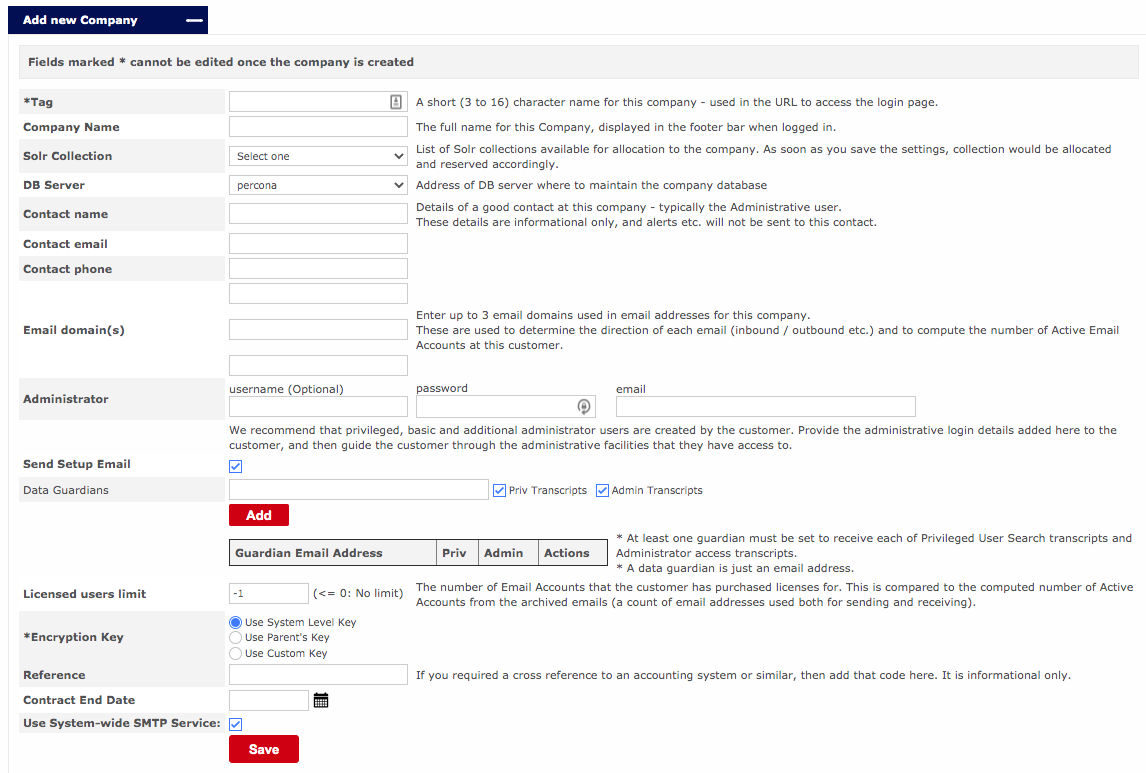
The form to enter company details will be displayed:

<figure><img src="/files/1yX4oX3dzhN0Msf1Pwfm" alt=""><figcaption><p>Tenant Creation Options</p></figcaption></figure>

{% hint style="info" %}
Fields marked \* cannot be edited once the company is created.
{% endhint %}

### 4. Enter the details of the company&#x20;

Refer to the table at the bottom of this guide for field names and descriptions.

### 5. Click "Save"

We have now created our tenant and are now ready to proceed to the next guide.

{% hint style="info" %}
If you are opting for "Automated Onboarding" this is where the guide ends. Please make sure you have checked "Send setup email" from the list of options. After clicking "save" the user will now receive an email to proceed with onboarding.
{% endhint %}

| Field Name                        | Description                                                                                                                                                                                                                                                                                                                                                                                                                                                                                                                           |
| --------------------------------- | ------------------------------------------------------------------------------------------------------------------------------------------------------------------------------------------------------------------------------------------------------------------------------------------------------------------------------------------------------------------------------------------------------------------------------------------------------------------------------------------------------------------------------------- |
| **Tag**                           | <p>Short name of the company that will be used in the URL to access a specific company login and serve as a unique identifier.<br>Cannot be changed after the company has been created.</p>                                                                                                                                                                                                                                                                                                                                           |
| **Company Name**                  | <p>Full name of the company.<br>Shown on the login page and in the footer line of all subsequent pages, and on some alert emails.</p>                                                                                                                                                                                                                                                                                                                                                                                                 |
| **Solr Collection**               | <p>SOLR Collection that will be allotted to the company. It is a logical index spread across multiple servers.<br>Leave as default unless instructed by your supplier.</p>                                                                                                                                                                                                                                                                                                                                                            |
| **DB Server**                     | <p>Address of the database server on which the company database will be stored.<br>Leave as default unless instructed by your supplier.</p>                                                                                                                                                                                                                                                                                                                                                                                           |
| **Contact Name**                  | <p>Name of the contact person in the company, preferably the Admin user.<br>Info only.</p>                                                                                                                                                                                                                                                                                                                                                                                                                                            |
| **Contact Email**                 | <p>Email address of the contact person in the company.<br>Info only.</p>                                                                                                                                                                                                                                                                                                                                                                                                                                                              |
| **Contact Phone**                 | <p>Phone number of the contact person in the company<br>Info only.</p>                                                                                                                                                                                                                                                                                                                                                                                                                                                                |
| **Email domain(s)**               | <p>Add up to 3 email domains used in email addresses for this company.</p><p>These are used to determine the direction of each email (inbound / outbound etc.) and to compute the number of Active Email Accounts at this customer.</p>                                                                                                                                                                                                                                                                                               |
| **Administrator**                 | Provide the administrative login details added here to the customer, and then guide the customer through the administrative facilities that they have access to.                                                                                                                                                                                                                                                                                                                                                                      |
| **Send Setup Email**              | Checking this box will send the automated M365 onboarding email to the administrator address supplied above.                                                                                                                                                                                                                                                                                                                                                                                                                          |
| **Data Guardians**                | <p>A Data Guardian is, in <strong>YOUR ARCHIVE</strong>, an email address to which transcripts of administrator access and privileged user searches will be sent. At least one data guardian must be added, before adding any local user accounts.</p><p>You can also specify whether or not this data guardian can receive Privileged User Search transcripts and Administrator access transcripts.</p>                                                                                                                              |
| **Licensed users limit**          | <p>As emails are archived, <strong>YOUR ARHIVE</strong> will compute an active mailbox count. When the computed active mailbox count exceeds the <strong>Licensed users limit</strong>, then the usage data will be highlighted to the administrator.</p><p><strong>Note</strong>: Active accounts are computed by <strong>YOUR ARCHIVE</strong> as the number of unique ‘local’ email addresses that are used for both sending and receiving emails.  ‘Local’ addresses are those that match the configured local email domains.</p> |
| **\*Encryption Key**              | <p>Specify the type of encryption key to be used. The available options are System Level Key, Parent’s Key, and Custom Key.<br>Leave as default unless instructed by your supplier.</p>                                                                                                                                                                                                                                                                                                                                               |
| **Reference**                     | Any account number or billing number or any note related to the customer can be used as a reference. This could be used to link to an Accounting system, project number, or any other reference desired.                                                                                                                                                                                                                                                                                                                              |
| **Contract End Date**             | The date on which the customer’s contract ends.                                                                                                                                                                                                                                                                                                                                                                                                                                                                                       |
| **Use System-wide SMTP Services** | <p>Specify whether or not to allow system-wide SMTP services.<br>Leave as default unless instructed by your supplier.</p>                                                                                                                                                                                                                                                                                                                                                                                                             |
